AmiBroker Documentation
Item No. ab305.html
This is the part of AmiBroker
documentation. Copyright ©2002, 2019 Tomasz Janeczko. All rights reserved.
HOWTO: Setup complete US stocks database using
Yahoo free quotes.
IMPORTANT: This document has been
updated in December 2019 to reflect built-in method of setting up US database
Introduction
The purpose of this document is to explain how
to use AmiQuote and AmiBroker to build complete US stocks database using free
quotes from Yahoo finance sites. AmiQuote is a companion program to AmiBroker
stock charting/analysis software.
Requirements
You will need REGISTERED AmiBroker
version 6.00 or higher and AmiQuote 4.0 installed. (Trial version of
AmiBroker
is not enough for this purpose because it does not save the database)
Setting up categorized US database
There are only two steps required to set up
US database with all US symbols categorized into industries:
- Create an empty
database using File->New Database
- Choose Tools->Update US symbol list
and categories
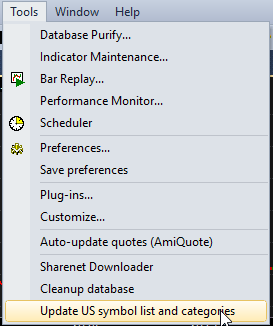
Symbols are assigned to correct categories which
you can check by unfolding for example Sectors folder in the Workspace
| Symbols tree. The database does not however contain any quotes which
is communicated by "DJA - chart not available - too few quotations" message
that you can see displayed in the price chart.
Updating database
Now the only thing left is to download quotes.
All you have to do it to choose Tools | Auto update quotes menu:
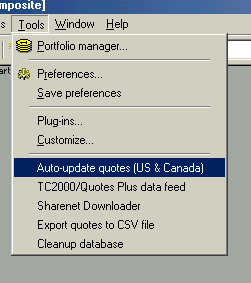
This will launch AmiQuote that will automatically
retrieve the symbol list from AmiBroker and start downloading 2 years of historical
data for all 7700+ symbols:
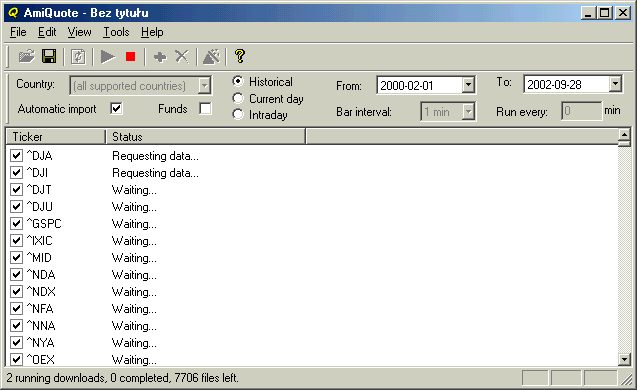
Please note that it may take few seconds for
AmiQuote to retrieve thousands of symbols from AmiBroker. During this time
AmiQuote may appear "frozen" - this is normal and you should
just wait until symbol list appears.
After download is finished AmiQuote will start
updating quotes in AmiBroker. Please note that you have to have AmiBroker
running while AmiQuote is updating otherwise quotes won't be imported
to AmiBroker.
At any time you can stop the download by pressing
Stop button (red rectangle) and resume it by pressing Download button
(green arrow) in AmiQuote. (This way you can also import already downloaded
quotes before downloading all symbols). You can stop, adjust From-To date
range and start again to download longer/shorter history.
When download and update completes you should
be able to see historical charts covering 2 last years. Then you should choose
File | Save Database to permanently store quotes into
AmiBroker's database.
Important notes
Please note that 2
years worth of end-of-day data for 7700+ stocks accounts for roughly
220MB (megabytes) of data (7700+ files 29KB each).
Further information
For further information
please consult AmiBroker User's Guide section Tutorial: How to update US
quotes automatically using AmiQuote. and Tutorial: How to download
quotes manually using AmiQuote
In case of any further
questions, comments and suggestions please contact: support@amibroker.com
Part of AmiBroker documentation project. Copyright
(C)2002, 2019 Tomasz Janeczko. All rights reserved.