April 24, 2006
Using redundant signals for entries
NOTE: THIS ARTICLE IS NOW OUTDATED AS AMIBROKER SUPPORTS NEW BACKTEST MODE THAT HANDLES THIS NATIVELY http://www.amibroker.com/f?setbacktestmode
The sample code below shows how to use custom portfolio backtester procedure to change the way backtester works. Normally buy is matched against sell and redundant buy signals between initial buy and matching sell are removed as shown in the picture there:
http://www.amibroker.com/gifs/bt_regular.gif
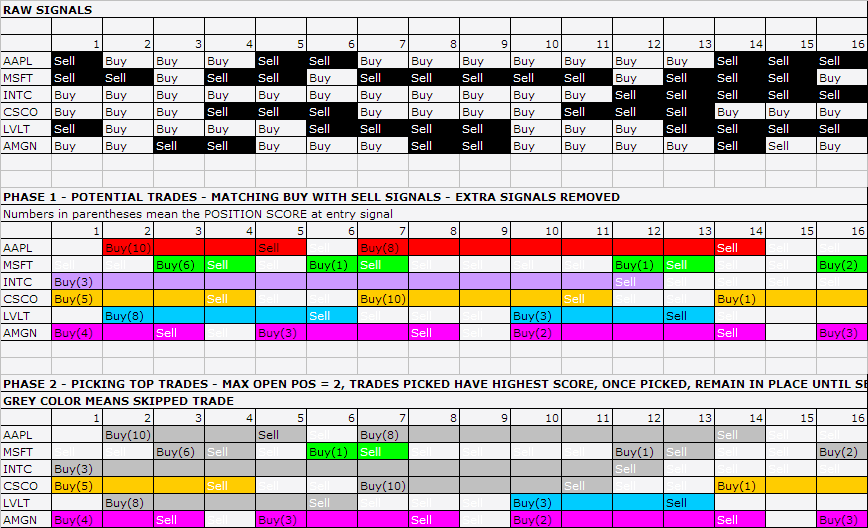
The procedure below changes this behaviour and allows to use redundant signals (they are not removed).
This is done by changing Buy array values from “true” to sigScaleIn (this prevents redundant signals from being removed because scale-in marks are kept untouched) and modifying standard procedure to treat scale-in signals as normal buys (no scaling).
Note that there are many ways to achieve the same effect. The technique presented here was choosen because it is easy-to-use (does not require changes in your core trading system code – all it needs is to plug-in the custom backtest part). Longer implementation would be required if you do not want to (ab)use scaling signals.
One thing worth mentioning is the fact that since scaling-in signals do not store position score this example formula does not support ranking of signals according to user-defined scores.
// YOUR TRADING SYSTEM HERE
Buy= H == HHV( H, 10 ); // REPLACE THIS WITH YOUR OWN BUY RULE
Sell = L == LLV( L, 10 ); // REPLACE THIS WITH YOUR OWN SELL RULE
PositionSize = -20;
SetOption("MaxOpenPositions", 5 );
// END OF TRADING SYSTEM HERE
// COMMON CODE PART
// TO BE COPY-PASTED if you want keep redundant signals
// This is long-only version.
// It is easy to extend to handle short trades as well
Buy = IIf( Buy, sigScaleIn, False ); // replace regular buy signals by scale in
// so they do not get filtered
SetOption("UseCustomBacktestProc", True );
if( Status("action") == actionPortfolio )
{
bo = GetBacktesterObject();
bo.PreProcess(); // Initialize backtester
for(bar=0; bar<BarCount; bar++)
{
for ( sig=bo.GetFirstSignal(bar); sig; sig=bo.GetNextSignal(bar) )
{
// first handle exit signals
if (sig.IsExit() AND sig.Price != -1 )
{
// Exit Signal
bo.ExitTrade(bar,sig.symbol,sig.Price);
}
}
// update stats after closing trades
bo.UpdateStats(bar, 1 );
bContinue = True;
for ( sig=bo.GetFirstSignal(bar); sig AND bContinue;
sig=bo.GetNextSignal(bar))
{
// enter new trade when scale-in signal is found
// and we don't have already open position for given symbol
if (sig.IsScale() AND sig.Price != -1 AND
IsNull( bo.FindOpenPos( sig.Symbol ) ) )
{
// Entry Signal
if( bo.EnterTrade(bar, sig.symbol, sig.IsLong(),
sig.Price,sig.PosSize) == 0 )
{
// if certain trade can not be entered due to insufficient funds
// or too small value (less than "MinPositionValue") or
// to few shares (less than "MinShares"
// then do NOT process any further signals
bContinue = False;
}
}
}
bo.UpdateStats(bar,1); // MAE/MFE is updated when timeinbar is set to 1.
bo.UpdateStats(bar,2);
}
bo.PostProcess(); // Finalize backtester
}
Filed by Tomasz Janeczko at 5:50 am under AFL, Custom Backtest
15 Comments

TJ:
The sample code didn’t work. I did a trace of the scaleIn signals, and found:
1. the scaleIn signals were not sorted by PositionScore but by alphanumeric order.
2. actually the PosScore and RoundLotSize is EMPTY for scaleIN signals.
3. I still had the 1e+010 shares problem when using scaleIn.
(To compare, I removed the scaleIn code and changed sig.IsScale() to sig.IsEntry(), the trace showed that the entry signals were sorted as expected)
Thanks,
-Mark
if (sig.IsScale() AND sig.Price != -1 AND
IsNull( bo.FindOpenPos( sig.Symbol ) ) )
{
// Entry Signal
_TRACE(”Entry ” + sig.symbol + ” ” + NumToStr(sig.PosSize) + “/” + NumToStr(sig.PosScore) + “/” + NumToStr(sig.RoundLotSize) + “@ $” + NumToStr(sig.Price));
if( bo.EnterTrade(bar, sig.symbol, sig.IsLong(),
sig.Price,sig.PosSize,sig.PosScore,sig.RoundLotSize) == 0 )
{
// if certain trade can not be entered due to insufficient funds
// or too small value (less than ”MinPositionValue”) or
// to few shares (less than ”MinShares”
// then do NOT process any further signals
bContinue = False;
}
It works after one correction : sig.PosScale and sig.RoundLotSize should not be passed to EnterTrade function.
The formula is corrected now.
Scaling signals do not hold score or round lot size because this information is stored in initial buy signal that is used under normal circumstances. There is no need for scaling signals to be sorted as well because scaling operates
on already open positions and AmiBroker under normal circumstances just matches scaling signals to open position list. It is similar to exit signals. *ALL* exit and scaling signals are tracked (opposite to entry signals where only top 2 * max( worstrankheld, maxopenpositons) entry signals are tracked. There is large number of speed optimizations in AmiBroker that make it so fast and this is one example of it – sorting (computationally intensive) is not done unless absolutely necessary.
TJ:
You mentioned: “Longer implementation would be required if you do not want to (ab)use scaling signals. “, can you give me some more information how to do that?
The current impl using scalein doesn’t work for me since I do need to sort the signals.
Thanks in advance,
- Peter
hello,
I don’t see how one can use this example if one can not use ranking. I have been trying to get an example on how to use redundant signals and perform a full portfolio backtest for about 2 years now. Twice I have been promissed this would be published as soon as something else was finished. There now are numorous examples of how one can do certain things in that direction but there is always something that can’t be done. Either one can’t use ranking, or it is only possible to perform such a backtest on a single symbol. Isn’t there a general way to tackle this problem so that one can do a portfolio type backtest as one normally does using all available signals?
As an example I suggest a simple system that get’s entry signals in overbought and oversold areas and looks for an exit after 4 bars.
/////////////////////////////////////////////////////////////////
// entry signals
SetTradeDelays(0,0,0,0);
sk1 = StochK(15,3);
Buy = sk1 80; Short = Ref(Short,-1);
PositionScore = Ref((50 – sk1),-1);
// exit code:
// 1) needs to evaluate all available signals for each bar for a list of symbols using the portfolio backtester + custer backtest code
// 2) finds the exit bar for a chosen signal using certain criteria (in this example case exit after 4 bars).
/////////////////////////////////////////////////////////////////
I am hoping such code will be published one day. If it can’t be done I will still remain a very happy user of Amibroker.
Thanks, Ed
If you need to use PositionScore, then this sample code published on the list may
help you:
http://finance.groups.yahoo.com/group/amibroker/message/99785
See also issue #105 at Feedback Center. This is planned to be supported natively.
that is great news. I didn’t know that. This feedback center is just awesome!
hi,
is there any news on when this issue #105 will be implemented?
Thanks, Ed
I think that it will be in 4.92.
why does this code not use bo.ProcessTradeSignals( bar ); ?
Ed
Because it is LOW-LEVEL example. ProcessTradeSignals() is medium-level function. http://www.amibroker.com/guide/a_custombacktest.html
In low-level mode we handle signals on our own, and we don’t need/want default signal processing.
TJ, do you have any better idea that when you gonna implement #105 ?
Available NOW in 4.96.0
See:
http://www.amibroker.com/devlog/2007/05/23/amibroker-4960-beta-released/
Does the behavior of the example code just emulate the traditional Buy (after redundant signals have been removed and ignoring position score)? Or would the results from the example code be different than the traditional Buy? I’m trying to see if I understand the code. Am I correct in concluding that it is an emulation of Buy?
Whould you please explain why you are using sig.Price != -1 in “if (sig.IsExit() AND sig.Price != -1 )”?
@Mike: One can say that, but right now you should be using version 5.0 that natively supports redunant buy signals (doesn’t remove them) if you use SetBacktestMode( backtestRegularRaw )
@Cam: -1 is special marker meaning – ignore this signal.