
March 24, 2007
How to plot a trailing stop in the Price chart
In this short article we will show how to calculate and plot trailing stop using two different methods.
First method uses looping and it does not use ApplyStop() function as it does not plot stops – it only triggers them in backtest mode. The stop % level can be adjusted via PARAMETERS dalog.
StopLevel = 1 - Param("trailing stop %", 3, 0.1, 10, 0.1)/100;

Buy = Cross( MACD(), Signal() );
Sell = 0;
trailARRAY = Null;
trailstop = 0;

for( i = 1; i < BarCount; i++ )
{

   if( trailstop == 0 AND Buy[ i ] )
   {
      trailstop = High[ i ] * stoplevel;
   }
   else Buy[ i ] = 0; // remove excess buy signals

   if( trailstop > 0 AND Low[ i ] < trailstop )
   {
      Sell[ i ] = 1;
      SellPrice[ i ] = trailstop;
      trailstop = 0;
   }

   if( trailstop > 0 )
   {
      trailstop = Max( High[ i ] * stoplevel, trailstop );
      trailARRAY[ i ] = trailstop;
   }

}

PlotShapes(Buy*shapeUpArrow,colorGreen,0,Low);
PlotShapes(Sell*shapeDownArrow,colorRed,0,High);

Plot( Close,"Price",colorBlack,styleBar);
Plot( trailARRAY,"trailing stop level", colorRed )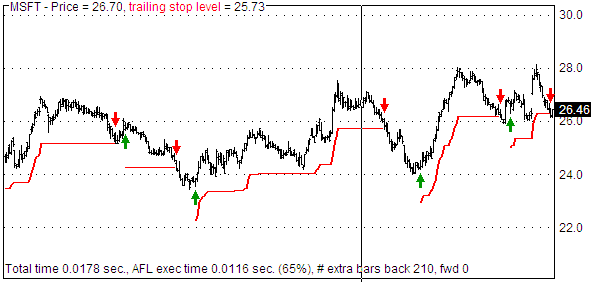
Alternatively you can use code without looping, but then it requires Equity(1) to evaluate stops as shown in the example code below. Equity( 1 ) is the backtester-in-a-box that runs actual single-security backtest and when parameter 1 is passed it writes back signals (removing excessive ones and writing out all stops to Buy/Sell/Short/Cover arrays).
StopLevel = Param("trailing stop %", 3, 0.1, 10, 0.1 );

SetTradeDelays(0,0,0,0);

Buy = Cross( MACD(), Signal() );
Sell = 0;
ApplyStop( stopTypeTrailing, stopModePercent, StopLevel, True );

Equity( 1, 0 ); // evaluate stops, all quotes

InTrade = Flip( Buy, Sell );

SetOption("EveryBarNullCheck", True );
stopline = IIf( InTrade, HighestSince( Buy, High ) * ( 1 - 0.01 * StopLevel ), Null );

PlotShapes(Buy*shapeUpArrow,colorGreen,0,Low);
PlotShapes(Sell*shapeDownArrow,colorRed,0,High);

Plot( Close,"Price",colorBlack,styleBar);
Plot( stopline, "trailing stop line", colorRed )
 Filed by AmiBroker Support at 11:06 am under Indicators
 1 Comment
Thanks for the looping example. Examples that address issues via looping and also array approach are appreciated.