How to detect the study crossover for multiple symbols with use of SCAN

It’s possible to use Automatic Analysis window to search for trendline (or other study) crossovers for multiple symbols at once. It’s necessary to do the following:

1. Draw trendlines on the chart and assidn them a STUDY ID – two letter code that allows to recognise the particular study. To do this, go to study properties (Alt+Enter) after you draw the line (in this example – StudyID = “RE”).
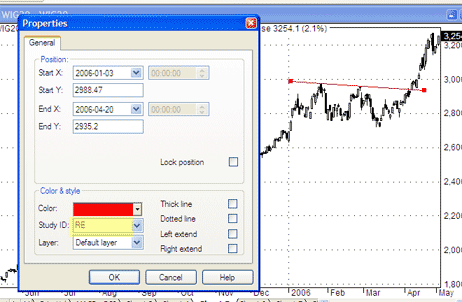
study1.gif

2. Repeat the process for other symbols (remember to draw the trendlines in the same chart pane).

3. Check the CHART ID (in order to call this particular chart pane from the SCAN). To check the ChartID – click on the chart with right mouse button, go to: PARAMETERS -> Axes&Grid (in this example – CHARTID = 1023).
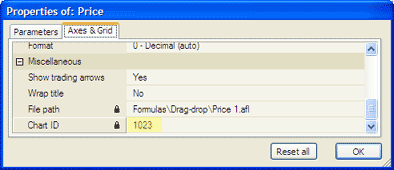
study2.gif

4. Now we can write the formula:
- Analysis -> Formula Editor
- enter:

Buy = Cross( Close, Study(”RE”, 1023) );

(note that we use the same StudyID and ChartID in the formula)
- Tools -> Send to analysis.
- Apply To: All Symbols, All Quotations
- press SCAN

5 Responses to “How to detect the study crossover for multiple symbols with use of SCAN”

  1. Tim
    September 26th, 2008 | 8:31 pm

    Do you have to use the same symbol to draw different trendlines or can you use different symbols utilizing different trendlines? I am particularly interested in scanning for such trendlines before they are broken and utilizing an alert to tell me when they are broken intraday, is this possible?

  2. September 27th, 2008 | 3:22 am

    You can have different trendlines with different StudyIDs. You can simply type different study ID in its entry field.

  3. Tim
    September 28th, 2008 | 7:36 am

    Thank you Tomasz. Do I manually have to draw a trendline on every chart or will the software look for that kind of trendline pattern on the stock list I select? I am attempting to scan my list of stocks for triangles and rectangle patterns before they breakout. Then with an alert of some kind I can be ready to trade the breakout. Thank you for any and all help.

  4. Tim
    October 13th, 2008 | 1:29 pm

    Hi Tomasz,
    In the example there is 1 trendline drawn. Is it possible to have 2 trendlines drawn on the same chart and have AB find similar patterns? In the example chart if another trendline was drawn across the lows it would look like a descending wedge would it be possible to use this study to find triangular patterns and assign each one a study ID? Thank you.

    Tim

  5. October 13th, 2008 | 5:09 pm

    Yes but you need to have 2 separate IDs. TO assign different IDs use Properties window.
    By the way: you will get much faster responses if you use support at amibroker.com e-mail. Thank you.

Leave a reply