How to display the indicators based on Advances/Declines

In order to display indicators based on Advances/Declines first of all it’s necessary to calculate composities in the database:

  1. Open Categories window using Symbol->Categories menu item.
  2. Select base index for given market in Markets tab and Base indexes for - Composites combo.
    For example if you are following NYSE this can by ^DIJ (Dow Jones Average)
    (certain symbol must be marked as index in Symbol -> Information and must belong to the same market)
  3. Choose Symbol ->Calculate composites  menu item to open the window shown below and mark:
    - Number of advancing/declining issues and
    - Apply to: all quotes, All markets
  4. Click Calculate . From now on ADLine, AdvVolume() and TRIN indicators will be visible.

Q: Why does AB need “base index”?
A: Just because it may happen that not all stocks are quoted every businness day and AB needs must calculate number of advancing/declining issues per market. So it checks the “base index” quotations dates and tries to find corresponding quotes of all stocks belonging to that market to find out how many issues advanced, declined and not changed at all.

Q: What are “Volume for base index” and “Copy volume to all indexes” checkboxes for?
A: “Volume for base index” and “Copy volume to all indexes” are provided in case you DON’T have real volume data for index quotes. In that case AmiBroker can calculate volume for index as a sum of volumes of all stocks belonging to given market. First option assigns calculated volume only to “base index”, the second copies the volume figure to all indexes belonging to given market.

How to detect the divergences

There are many different ways to check for divergences. One of the simplest is to use Rate of change indicator and EXPLORATION feature of Automatic Analysis window:

- Analysis -> Formula Editor
- enter:
 
// 5 day rate of change of close
PriceUp ROCC) > 
// 5 day rate of change of MACD histogram
MacdUP ROCMACD() - Signal(), ) > 0
BullishDiv NOT PriceUP AND MACDUp;
BearishDiv PriceUP AND NOT MACDUp;
Filter BullishDiv OR BearishDiv;
AddColumnBullishDiv"Bullish Divergence"1.0
       
colorDefaultIIf(BullishDivcolorGreencolorDefault ) ); 
AddColumn
BearishDiv "Bearish Divergence"1.0
       
colorDefaultIIf(BearishDiv colorRedcolorDefault) );

- Tools -> Send to Auto-analysis
- Apply to: All Symbols, N last quotations = 1
- press EXPLORE

Tools -> Send to Auto-analysis- Apply to: All Symbols, N last quotations = 1- press EXPLORE

A different approach can use linear regression instead:
 
// 10 day linear regression slope of close
PriceUp LinRegSlopeC10 ) > 
// 10 day linear regression slope of MACD histogram
MacdUP LinRegSlopeMACD() - Signal(), 10 ); 


How to detect the study crossover for multiple symbols with use of SCAN

It’s possible to use Automatic Analysis window to search for trendline (or other study) crossovers for multiple symbols at once. It’s necessary to do the following:

1. Draw trendlines on the chart and assidn them a STUDY ID - two letter code that allows to recognise the particular study. To do this, go to study properties (Alt+Enter) after you draw the line (in this example - StudyID = “RE”).

study1.gif

2. Repeat the process for other symbols (remember to draw the trendlines in the same chart pane).

3. Check the CHART ID (in order to call this particular chart pane from the SCAN). To check the ChartID - click on the chart with right mouse button, go to: PARAMETERS -> Axes&Grid (in this example - CHARTID = 1023).

study2.gif

4. Now we can write the formula:
- Analysis -> Formula Editor
- enter:

Buy = Cross( Close, Study(”RE”, 1023) );

(note that we use the same StudyID and ChartID in the formula)
- Tools -> Send to analysis.
- Apply To: All Symbols, All Quotations
- press SCAN

New keywords in AFL and possible conflict with user-defined variables

AmiBroker 4.91.0 BETA introduced the following new keywords:

switch, case, break, continue, default

You have to make sure that your formulas do not use them as variable names. The above words are now reserved AFL keywords and if you use them for your own variables you need to replace this identifiers with names that do not conflict with the reserved keywords.

This article shows how to perform multiple-file text replace very quickly. (more…)

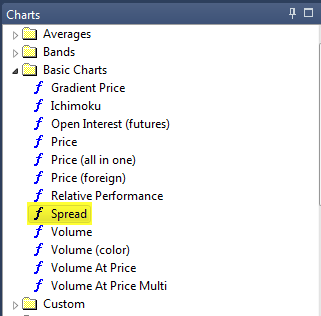
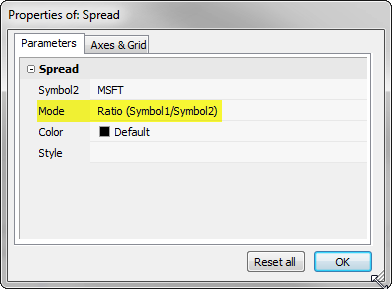
How to chart spreads?

To create a spread chart (and other multi-security indicators / statistics etc.) one can use FOREIGN function which allows to refer to other symbols than currently selected:

It’s necessary to do the following:
- Analysis -> Formula Editor
- enter the formula:

spread Foreign"ticker1""C") - Foreign"ticker2""C");
Plotspread"spread"colorRed); 

- Tools -> Apply Indicator
(replace ticker1, ticker2 with actual symbol names)

How to plot a trailing stop in the Price chart

In this short article we will show how to calculate and plot trailing stop using two different methods. (more…)

How to fill the area between two lines with a solid color

This example shows how to fill the area between Bollinger Bands with a solid color. (more…)

Calendar day index

Someone asked me recently how to count calendar days (not bars) that passed since first available quote. Here is a sample formula that shows how to do that. (more…)

How to make vertical selection line thinner

AmiBroker 4.90 now has thick vertical selector line that plots behind chart lines to improve clarity and readability (selector does not cover candlesticks). Some users however prefer thin, single-pixel line. There is an easy way to switch. (more…)

Setting up with FXCM (forex broker)

I have just prepared instructions how to connect to FXCM (Forex broker) to get their real-time quotes.
Also included is small example database (1 day worth of 1 minute data) and all required programs.

For the details check: http://www.amibroker.com/fxcm.html

« Previous PageNext Page »